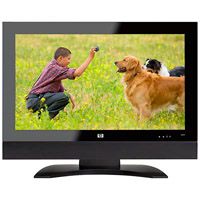
Most of us simply accept that when we go on vacation, the TV programming we watch in our living room is inaccessible. Most of us understand that when we're not at home, we can't watch the premium channels we pay for. Apparently, most of us are lacking in imagination.
It's not a new concept, but Sling Media has packaged it up real nice, simplified it and given it a name: "Placeshifting" technology grabs your television signal and sends it anywhere in the world. In this article, we'll find out how the Slingbox lets you "take your TV with you."
Advertisement
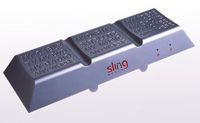
Slingbox is a set-top box that connects to your TV (or any other video-output device) and streams the signal to another machine in real-time -- there's no recording involved. This machine might be your computer in your home, in which case Slingbox streams the signal via your home network. It might be your Web-connected laptop or cell phone located anywhere in the world, in which case Slingbox streams the data via the Web. You can control the video that appears on your screen just like you were watching from home. There are several types of Slingboxes, ranging from the Classic Slingbox (the original model) to the Slingbox PRO-HD. Each model has its own bells and whistles, but they all perform the same basic function: delivering live television from your TV to a networked device.
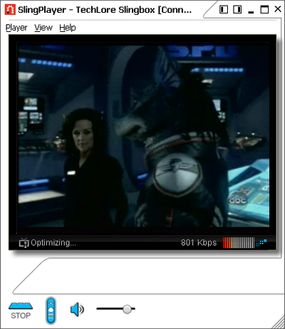
Slingbox works in conjunction with the SlingPlayer software you install on your computer. Together, they "sling" NTSC or PAL video data to another location. It works with regular TV, satellite TV, cable TV, a DVD player, DVR or camcorder. It also works with Apple TV boxes and iPods that are docked in either an Apple Universal Dock or an Apple iPod Hi-Fi. If it's NTSC (the video broadcast standard in the United States) or PAL/SECAM (the dominant standards outside the United States), you can sling it. See How Video Formatting Works to learn about NTSC, PAL and SECAM formats.
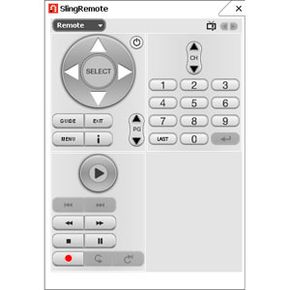
The coolest part of the Slingbox setup is that you can fully control the video source from your computer. The SlingPlayer has thousands of remote-control codes built in, and you can chose a virtual remote that looks just like the remote sitting on your coffee table.
Advertisement
Sitting in your office or in a WiFi coffee shop on the other side of the world, you can change the channel on your TV, fast forward through programs on your DVR and adjust the contrast of your TV picture. There are no subscription fees, just a one-time purchase price for the hardware (between $179 and $299, depending on the model) and software (free for PC or Mac -- for mobile phones, a one-time license fee of $29.99 per device). You can install the SlingPlayer software on as many devices as you want, but only one device can access the Slingbox at a time.
To sling your TV programming, you need the following equipment in addition to the Slingbox:
A video source
A computer running Windows 2000/XP/MCE or Mac OS X 10.4 or higher (no Linux support yet) or a Web-enabled cell phone running Windows Mobile Platform 4.0 or higher, PalmOS or Symbian, or a smartphone with either 3G or WiFi capabilities
You can set up a Slingbox for every video component in your home, but you can only access one Slingbox at a time. Depending on your Slingbox model, you can connect up to four components to one Slingbox. If you hook up your digital cable box and your DVD player to a single Slingbox, you can switch between them at the click of a button on your virtual remote control. You should check for the latest firmware updates before using your Slingbox.
The Slingbox is actually a pretty straightforward machine. The main components involved in slinging your video signal are:
Advertisement
A digital media processor that handles digital signal processing and video encoding
An Ethernet port (RJ-45)
A TV tuner
The basic process looks like this:
You connect your TV's video output to the Slingbox tuner.
The Slingbox grabs the video signal from your TV.
The digital media processor (acting as a DSP) converts the signal into digital data the Slingbox can manipulate.
The digital media processor (acting as a video encoder) compresses the data using a Windows- or Mac-compatible codec.
The Slingbox broadcasts the compressed data stream in real time via the Ethernet port. It uses a proprietary streaming protocol called SlingStream, which adjusts the stream on the fly to adapt to varying network speeds.
You access the stream via your home network or a broadband connection using SlingPlayer software on your computer.
To access the stream from your Slingbox via the Internet (as opposed to your home network), you tell the Sling Media server to find it for you. Every Slingbox has a Finder ID that's stored on your computer. When you initiate a remote connection to your Slingbox, your computer tells Sling Media's server what the Finder ID is, and the server matches your box's ID to its IP address. When you change the channel using your virtual remote, the command travels to your Slingbox just like any other Internet command -- as upstream data intended for a particular IP address. Because the video stream is downstream data, and remote commands are upstream data, the video travels faster than the commands. You may experience a delayed response when you click a button on your virtual remote.
Some SlingPlayer Features
SlingRemote Using a virtual remote control on your computer screen, you can control the video source just like you were sitting in your living room. You can push buttons on the remote using a mouse or trackball or your keyboard. SlingPlayer has a wide variety of remote skins for you to choose from, and many are based on the actual remote models sold with specific TV and set-top models. You might be able to pick one that looks exactly like your home remote.
Viewing modes You can watch the video stream on your computer as a full-screen view, a movable window or a Slingbar. Slingbar creates two separate areas on your computer screen: a "workspace" and a video space. If you're surfing and watching TV at the same time, you can maximize your browser window and not block the Slingbar video screen -- the browser window will only maximize to the extent of the "workspace."
Advertisement
Slingbox Setup
Slingbox configuration
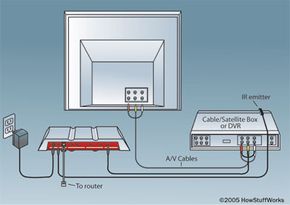
Let's say we're going to Sling our digital cable signal to our computer. That means our video source is the digital cable box. Here's what our overall configuration is going to look like:
Step 1: A/V Connections
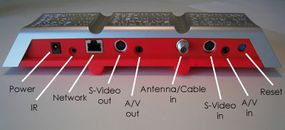
Setting up the Slingbox hardware is easy. Let's take the Classic Slingbox as an example. The first step is to connect the cable box to the Slingbox using an available video output on the cable box. We're going to use a Slingbox-supplied cable to connect the S-video, coaxial or composite video output on the cable box (S-video is the highest quality) to the corresponding input on the Slingbox. We can only make a composite audio connection, so that decision is simple.
Advertisement
Classic Slingbox connections
Photo courtesy Sling Community
If we had no available outputs on our cable box, we could use the Slingbox as a pass-through, connecting the cable jack to the Slingbox input and the Slingbox output to the cable box.
Step 2: Infrared (IR) Connections
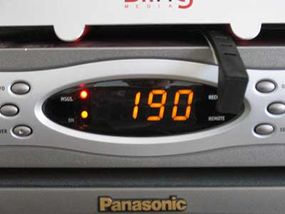
Next, we position the Slingbox IR emitter in front of the cable box's IR receiver. This is how you control the cable box from your computer. When you click "channel up" on your virtual remote, the SlingPlayer software tells the Slingbox to emit the "cannel up" IR code for your cable box.
IR emitter positioned in front of cable-box receiver
Photo courtesy Sling Community
Sling Media has built the infrared codes for thousands of devices into the SlingPlayer software -- you can't easily input your own IR codes, but even if your specific device isn't listed in the software setup, you'll be able to select a comparable unit. (See Sling Community: How to Add New Remote Control Codes to Your Slingbox to learn how you can teach your Slingbox new codes, if you're up to it.)
Step 3: Ethernet Connection
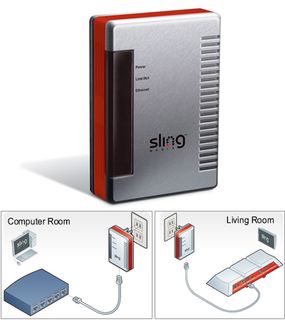
If we happen to have an Ethernet jack or router in our living room, we're golden. We just use the supplied Ethernet cable to connect the Slingbox Ethernet port to the Ethernet jack on the wall or router. Otherwise, we'll buy a couple of powerline-to-Ethernet wall adapters and make the connection that way (Sling Media sells their own version, called SlingLinks). The wall adapters turn a regular power outlet into an Ethernet jack, using a home's powerlines to send data from one Ethernet-enabled device to another (see HomePlug 1.0 Technology White Paper to learn about powerline networking). We just put one on an outlet near the Slingbox and another on an outlet near our router.
A SlingLink, top, can help you connect your Slingbox to the Internet.
Photo courtesy Sling Media
If you have a wireless router, you can either use a pair of SlingLinks or a WiFi-to-Ethernet bridge to make the network connection. Slingbox doesn't have WiFi built in.
Step 4: Power Up
The final step in hardware setup is to plug the Slingbox into a wall outlet.
Next, we move on to the software setup. Depending on the type of router you have and the video source you choose, you might run into a couple of snags.
Step 5: Configure the Software
The SlingPlayer software has a setup wizard that walks you through the whole process on your computer. We tell SlingPlayer what the Slingbox is connected to -- in this case, a digital cable box -- and the software spits out a list of makes and models. Hopefully, our digital cable box is on the list, in which case the software automatically configures Slingbox for our device. If it isn't, the software will guide us to a comparable device with similar settings and remote codes.
The place where some people run into trouble is the router configuration. If our router is Universal Plug 'n Play (UPnP), there's nothing to it but a couple of mouse clicks. If our router is not UPnP, there's going to be some effort involved in configuring it for the Slingbox. Again, the software will walk us through the process and tell us which settings to change. If manually configuring a router scares you, you may not be happy, but it's definitely doable.
We'll immediately know if we've configured everything correctly, because our digital cable programming will pop up on the computer screen. We may have to back up a couple of times to access the stream, or it may happen on the first shot. Once we've successfully accessed the stream from home, watching TV from a remote location should be a snap. The video quality from a WiFi hotspot may be choppier than it is at home, though, because network connection speeds vary. The greater the available bandwidth, the better the picture looks.
For complete setup instructions, see Sling Community: Installing Your Slingbox.
Slingbox is not your only option when it comes to watching your TV remotely. In the next section, we'll look at some other available technology and find out what Sling Media has in store for its flagship product.
Advertisement
The Future of Remote TV
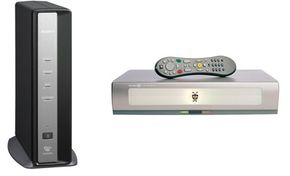
LocationFree TV (left) and TiVo Series 2
Photos courtesy Amazon.com
Sling Media struck it big by simplifying a process that has been around for a while, but mostly in high-tech circles. There are free downloads available, like VideoLAN, that let you stream any video signal (as well as pictures and music) from your home PC over the Internet, but these applications typically require a host PC along with a deeper level of technological expertise than the general public is comfortable with. The Slingbox offers placeshifting functionality in a device that's about as complicated to set up as a cable box and doesn't require a host compter. Slingbox is flying off the shelves because it makes remote viewing accessible to the masses.
Sony's LocationFree TV is a comparable product -- it's $200 and it has very similar functionality. In addition to computers, LocationFree TV also directs a video signal to a PSP. TiVo Desktop lets you watch your pre-recorded TiVo programs on your PC, Internet-connected laptop or a wide selection of handheld media players. If you have a TiVo Series 2 box or a TiVo HD DVR and you don't need to watch a show in real-time, this could be a good way to go -- there's no additional hardware or service fees involved.
Advertisement
There are also some free downloads out there, such as Orb and VideoLAN, that let you watch your TV programming from a computer. VideoLAN is combination media player/server that supports both Linux and Mac OS in addition to Windows machines, and Orb can stream content to Web-enabled smartphones and PDAs in addition to computers.
To stay ahead of the competition, Sling Media is in constant upgrade mode. Sling Media offers an HD version of Slingbox. The Solo and PRO models can accept HD content, but they both down-convert the signal into a standard definition format before streaming it to your device. Only the Slingbox PRO-HD can stream HD content to other devices.
The big issue right now surrounding "placeshifting" TV is about copyright and digital rights issues. Like the music and motion-picture industries, the TV industry is concerned that people are going to be able to access their product for free. In the case of Slingbox, it's not just a concern about one person subscribing to HBO and giving their friends their Slingbox access codes so they can watch "Rome" without paying for it. The spatial nature of TV licensing adds another dimension to the risk. TV stations typically purchase program rights for a specific region, so "placeshifting" the TV signal infringes on regional access rights for certain shows. Sling Media says it's observing copyright and digital media laws because the Slingbox is a one-to-one transmission device. Slingbox owners can't broadcast a show to everyone they know. Only one person can access a Slingbox at a time, and if the device is used properly, only the person who pays for the programming can watch it. Only time will tell whether the TV industry will accept placeshifting technology like it ultimately accepted the "timeshifting" capabilities of TiVo and other DVRs.
For more information on Slingbox and related topics, check out the links on the next page.
Sling Catching
Slingboxes aren't the only products in Sling Media's arsenal. They also offer the SlingCatcher, a device that can send content from the Internet (or a Slingbox) to a television connected to the device. Think of it as a Slingbox in reverse.