Introduction to How Sound Cards Work

Computer Hardware Image Gallery

sound card
Photo courtesy HowStuffWorks Shopper
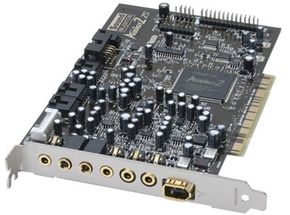
A sound card allows a computer to create and record real, high-quality sound. See more computer hardware pictures.

­Before the invention of the sound card, a PC could make one sound - a beep. Although the computer could change the beep's frequency and duration, it couldn't change the volume or create other sounds.

At first, the beep acted primarily as a signal or a warning. Later, developers created music for the earliest PC games using beeps of different pitches and lengths. This music was not particularly realistic -- you can hear samples from some of these soundtracks at Crossfire Designs.
­­
Fortunately, computers' sound capabilities increased greatly in the 1980s, when several manufacturers introduced add-on cards dedicated to controlling sound. Now, a computer with a sound card can do far more than just beep. It can produce 3-D audio for games or surround sound playback for DVDs. It can also capture and record sound from external sources.

Related Articles

­ In this article, you'll learn how a sound card allows a computer to create and record real, high-quality sound.


Want the best computer hardware?
For expert reviews of the best new computer hardware, check out our partner site Consumer Guide Products.

­

Analog vs. Digital

Sounds and computer data are fundamentally different. Sounds are analog - they are made of waves that travel through matter. People hear sounds when these waves physically vibrate their eardrums. Computers, however, communicate digitally, using electrical impulses that represent 0s and 1s. Like a graphics card, a sound card translates between a computer's digital information and the outside world's analog information.

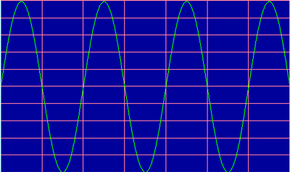
Sound is made of waves that travel through a medium, such as air or water.


The most basic sound card is a printed circuit board that uses four components to translate analog and digital information:

  • An analog-to-digital converter (ADC)
  • A digital-to-analog converter (DAC)
  • An ISA or PCI interface to connect the card to the motherboard
  • Input and output connections for a microphone and speakers
Instead of separate ADCs and DACs, some sound cards use a coder/decoder chip, also called a CODEC, which performs both functions.


A sound card must translate between sound waves and bits and bytes.


In the next section, we'll explore the analog-to-digital and digital-to-analog conversions that take place on the sound card.

X-Fi
One of the newest advances in sound card technology is X-Fi, or Xtreme Fidelity, from SoundBlaster manufacturer Creative. X-Fi features:
  • "Active Modal Architecture," which gives people different sound options for games, leisure use or music creation
  • A Digital Signal Processor (DSP) with 51 million transistors
  • Multiple processing engines, each of which performs specific sound operations
  • A 24-bit Crystallizer, which reverses some of the sound quality loss inherent in 16-bit CD recording
ExtremeTech has a comprehensive article detailing X-Fi's features.

ADCs and DACs

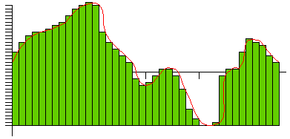
Imagine using your computer to record yourself talking. First, you speak into a microphone that you have plugged into your sound card. The ADC translates the analog waves of your voice into digital data that the computer can understand. To do this, it samples, or digitizes, the sound by taking precise measurements of the wave at frequent intervals.


An analog-to-digital converter measures sound waves at frequent intervals.


The number of measurements per second, called the sampling rate, is measured in kHz. The faster a card's sampling rate, the more accurate its reconstructed wave is.

If you were to play your recording back through the speakers, the DAC would perform the same basic steps in reverse. With accurate measurements and a fast sampling rate, the restored analog signal can be nearly identical to the original sound wave.

Even high sampling rates, however, cause some reduction in sound quality. The physical process of moving sound through wires can also cause distortion. Manufacturers use two measurements to describe this reduction in sound quality:

  • Total Harmonic Distortion (THD), expressed as a percentage
  • Signal to Noise Ratio (SNR), measured in decibels
For both THD and SNR, smaller values indicate better quality. Some cards also support digital input, allowing people to store digital recordings without converting them to an analog format.

Methods of Sound Creation
Computers and sound cards can use several methods to create sounds. One is frequency modulation (FM) synthesis, in which the computer overlaps multiple sound waves to make more complex wave shapes. Another is wave table synthesis, which uses samples of real instruments to replicate musical sounds. Wave table synthesis often uses several samples of the same instrument played at different pitches to provide more realistic sounds. In general, wave table synthesis creates more accurate reproductions of sound than FM synthesis.


Next, we'll look at the other components commonly found on sound cards and what they do.

Other Sound Card Components

In addition to the basic components needed for sound processing, many sound cards include additional hardware or input/output connections, including:

  • 3-D vs Surround Sound
    G­ame designers use 3-D sound to provide fast-paced, dynamic sound that changes based on a player's position in the game. In addition to using sound from different directions, this technology allows realistic recreations of sound traveling around or through obstacles. Surround sound also uses sound from several directions, but the sound does not change based on the listener's actions. Surround sound is common in home theater systems.
    Digital Signal Processor (DSP): Like a graphics processing unit (GPU), a DSP is a specialized microprocessor. It takes some of the workload off of the computer's CPU by performing calculations for analog and digital conversion. DSPs can process multiple sounds, or channels, simultaneously. Sound cards that do not have their own DSP use the CPU for processing.

  • Memory: As with a graphics card, a sound card can use its own memory to provide faster data processing.

  • Input and Output Connections: Most sound cards have, at the very minimum, connections for a microphone and speakers. Some include so many input and output connections that they have a breakout box, which often mounts in one of the drive bays, to house them. These connections include:
    • Multiple speaker connections for 3-D and surround sound
    • Sony/Philips Digital Interface (S/PDIF), a file transfer protocol for audio data. It uses either coaxial or optical connections for input to and output from the sound card.
    • Musical Instrument Digital Interface (MIDI), used to connect synthesizers or other electronic instruments to their computers.
    • FireWire and USB connections, which connect digital audio or video recorders to the sound card


Photo courtesy HowStuffWorks Shopper
A PCI sound card


Next, we'll look at integrated motherboard and external sound control options.

Drivers & APIs
Like a graphics card, a sound card uses software to help it communicate with applications and with the rest of the computer. This software includes the card's drivers, which allow the card to communicate with the operating system. It also includes application program interfaces (APIs), which are sets of rules or standards that make it easier for software to communicate with the card. The most common APIs include:
  • Microsoft: DirectSound
  • Creative: Environmental Audio Extensions (EAX) and Open AL
  • Sensaura: MacroFX
  • QSound Labs: QSound

Other Options for Sound Control

Not every computer has a sound card. Some motherboards feature integrated audio support instead. A motherboard that has its own DSP can process multiple data streams. It may also support 3-D positional and Dolby surround sound. However, in spite of these features, most reviewers agree that separate sound cards provide better audio quality.


Photo courtesy HowStuffWorks Shopper
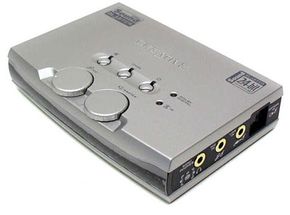
External sound controller


Laptops usually have integrated sound capabilities on their motherboards or small sound cards. However, space and temperature control considerations make top-of-the-line internal cards impractical. So, laptop users can purchase external sound controllers, which use USB or FireWire connections. These external modules can significantly improve laptop sound quality.

Shopping for a Sound Card
Numerous factors affect a sound card's abilities to provide clear, high-quality sound. When shopping for a sound card, pay attention to:
  • ADC and DAC data capacity, measured in bits
  • Signal-to-noise ratio (SNR) and total harmonic distortion (THD)
  • Frequency response, or how loudly the card can play sounds at different frequencies
  • Sampling rate
  • Output channels, such as 5.1 or 7.1 surround sound
  • Supported application programming interfaces (APIs)
  • Certifications, including Dolby Master and THX
Anyone investing in a top-of-the-line sound card should also have high-quality speakers. Even the best sound card cannot compensate for poor speaker quality.


For more information on sound cards and related topics, check out the links on the following page.

Lots More Information

Related HowStuffWorks Articles

More Great Links

Sources

  • Computer Hope: Sound Card ABCs
    http://www.computerhope.com/help/sound.htm
  • PC World: Audio Nirvana
    http://www.pcworld.com/reviews/article/0,aid,113750,00.asp
  • Microsoft: Sound Card 101
    http://www.microsoft.com/windowsxp/using/games/learnmore/soundcard101.mspx
  • Tom's Hardware Guide: Creative X-Fi: A New World of Sound
    http://www.tomshardware.com/consumer/20050818/index.html
  • Linux Sound How To
    http://www.djcj.org/LAU/guide/Sound-HOWTO-2.html
  • DAC-ADC
    http://www.gae.ucm.es/~padilla/extrawork/adc.html
  • The Tech Report
    http://techreport.com/reviews/2002q2/soundcards/index.x?pg=1
  • Extreme Tech: State of the Industry
    http://www.extremetech.com/article2/0,1697,1740269,00.asp
  • Extreme Tech: Creative Labs X-Fi
    http://www.extremetech.com/article2/0,1558,1850360,00.asp
  • Tom's Hardware Guide: Creative's X-Fi Sounds Fabulous
    http://www.tomshardware.com/consumer/20050705/index.html
  • Soundblaster
    http://www.soundblaster.com/